How Istio Works?
Istio & Service Mesh Simply Explained
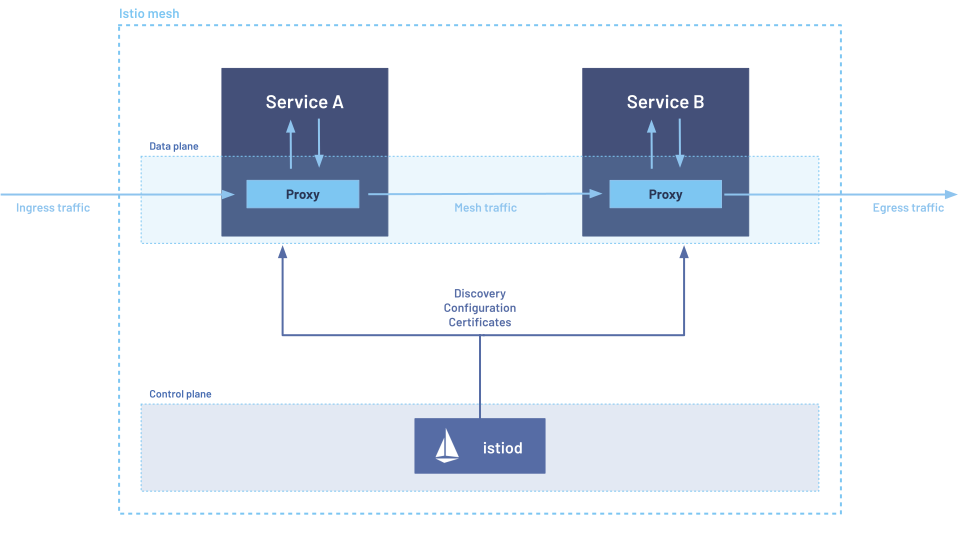
Core Components
Istio Ingress Gatewayis a key component that manages external access to the services within the mesh. It acts as a reverse proxy, routing incoming traffic to the appropriate service based on the defined rules.Istiodis the control plane component of Istio, responsible for managing the configuration and policy for the service mesh. It handles the distribution of configuration to the data plane proxies and provides APIs for managing the mesh. See here for more details.- The data plane is the communication between services. Without a service mesh, the network doesn't understand the traffic being sent over, and can't make any decisions based on what type of traffic it is, or who it is from or to. It supports two data planes:
- Sidecar mode, which deploys an Envoy proxy along with each pod that you start in your cluster, or running alongside services running on VMs.
- Ambient mode, which uses a per-node Layer 4 proxy, and optionally a per-namespace Envoy proxy for Layer 7 features
Ambient Mode
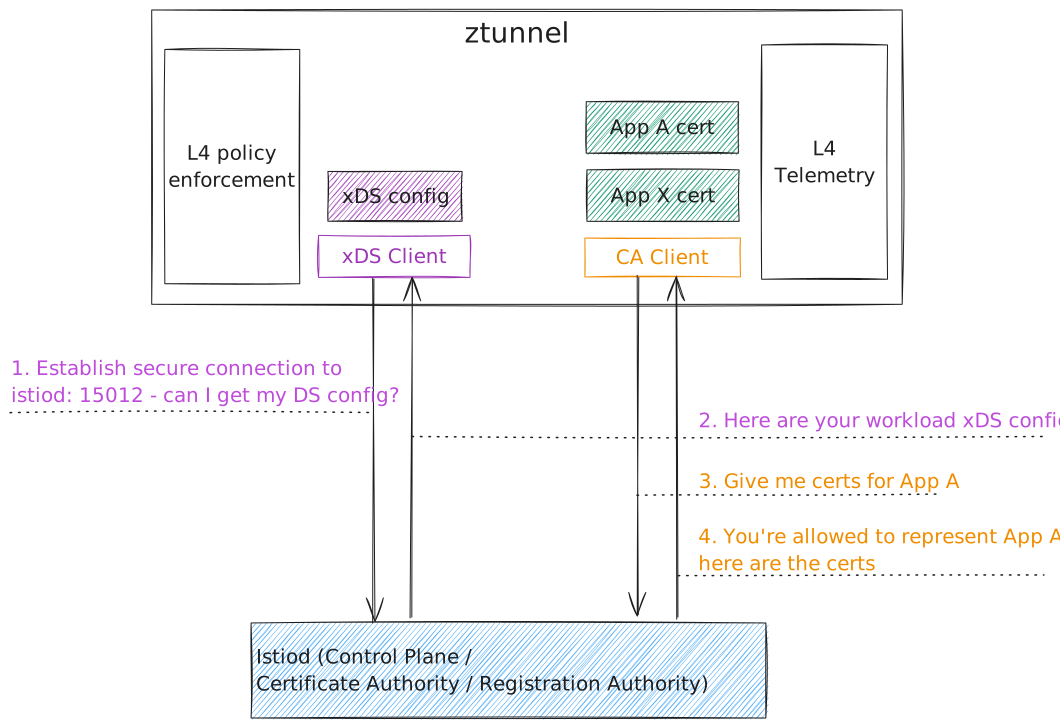
ztunnel architecture
For Istio Ambient mode, it relies on ztunnel (Zero Trust Tunnel) to provide L4 proxy capabilities at the node level.
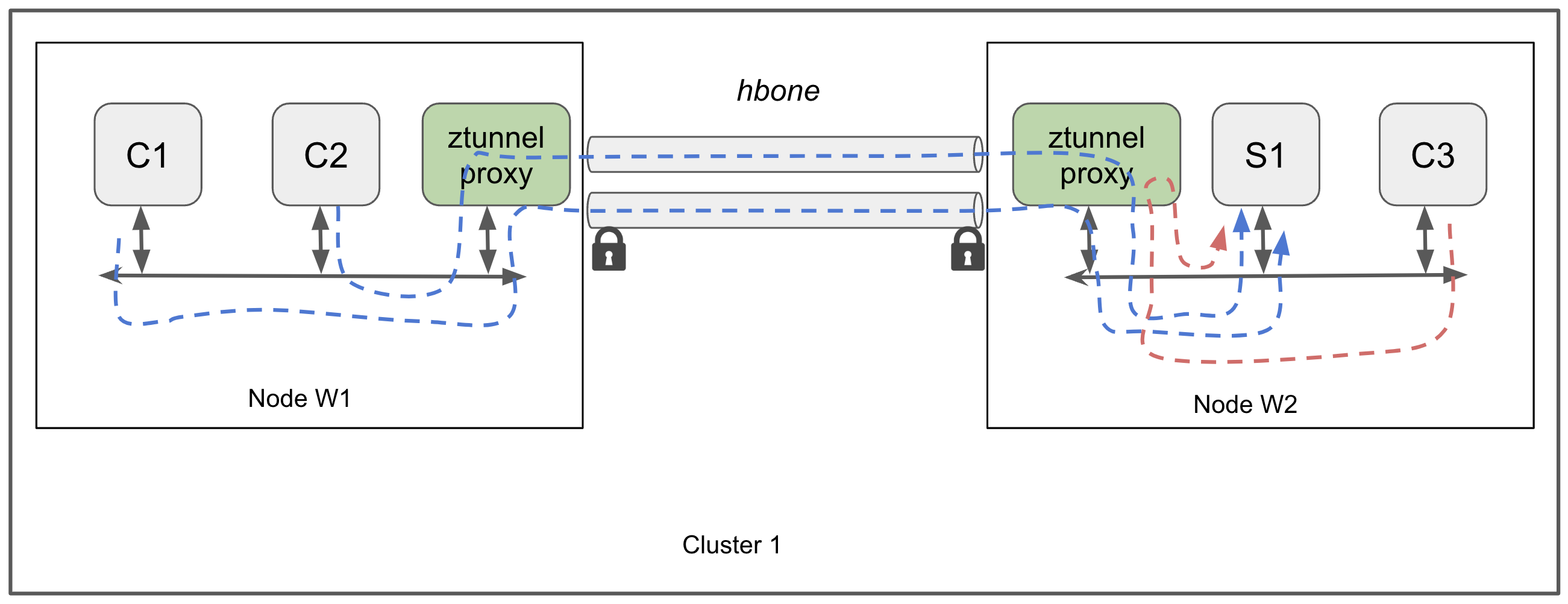
Basic ztunnel L4-only datapath
Beyond basic L4 proxying, Istio Ambient mode also supports deploying waypoint proxies within namespaces to enable advanced L7 features such as traffic routing, telemetry, and security policies.
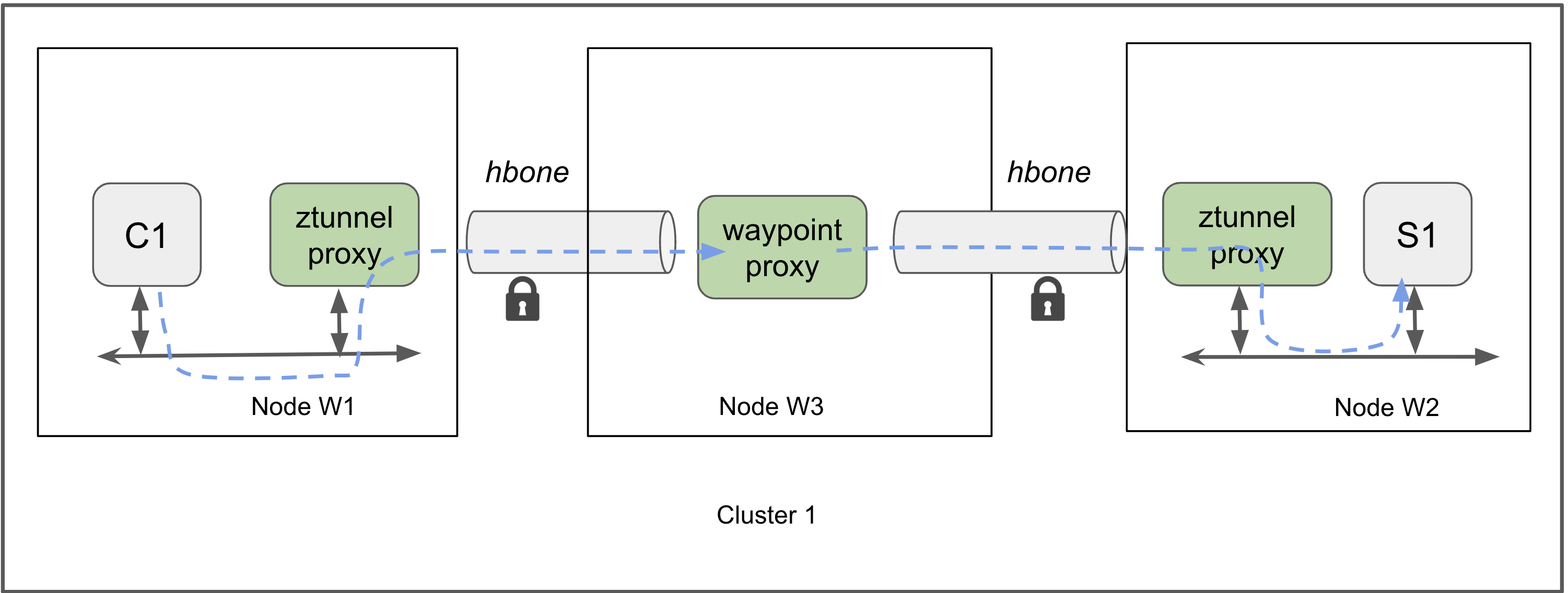
Ztunnel datapath via an interim waypoint
See Ambient data plane for more details.
Sidecar vs. Ambient
| Feature | Sidecar Mode | Ambient Mode |
|---|---|---|
| Proxy location | One per pod (sidecar) | One per node (ztunnel), plus optional waypoint proxies |
| Setup complexity | Requires injection into each pod | No sidecar; label namespace only |
| Resource usage | Higher | Lower |
| Feature maturity | Very mature | Newer, still evolving |
| Transparency to app | Yes | Yes |
| Traffic interception | iptables per pod |
eBPF or iptables at node level |
See Sidecar or ambient? | Istio for more details.
Why Not Just Use Kubernetes?
First, regarding traffic control, Kubernetes' native Ingress can only handle requests entering the cluster from external sources and has no control over internal communication between services. It cannot adjust routing logic based on versions, headers, user identity, or other conditions. Istio, through VirtualService and DestinationRule resources, enables fine-grained specification of traffic distribution. For example, directing specific users to new versions, implementing A/B testing, or canary releases, all while achieving flexible routing without modifying applications.
VirtualService: How you route your traffic TO a given destinationDestinationRule: Configure what happens to traffic FOR that destination
Next is the security aspect. While Kubernetes supports Role-Based Access Control (RBAC) and NetworkPolicy, it cannot ensure that communication between services is encrypted or verify the identities of communicating parties. Istio establishes encrypted channels between services through automated mutual TLS (mTLS) mechanisms, combined with authentication and authorization policies, ensuring that only authorized services can communicate with each other, thereby implementing the fundamental principles of zero-trust architecture.
Regarding observability, while Kubernetes allows viewing Pod logs and some basic metrics, its native functionality is clearly insufficient for microservice tracing, latency analysis, and traffic bottleneck identification. Istio deploys proxies at each service edge, enabling automatic collection of detailed telemetry information, including request-level tracing, traffic metrics, and error rates, integrated with tools like Prometheus, Grafana, and Jaeger—achieving comprehensive monitoring with minimal application modifications.
Finally, in terms of flexibility and extensibility, Kubernetes cannot inject custom network processing logic for individual services. Istio, through sidecar mode (or the newer ambient mode), provides each service with its own network proxy and supports WebAssembly plugins, allowing dynamic insertion of authentication logic, data transformation, or even fault simulation, adapting network behavior to meet business requirements.
What Happens After Installing Istio
After completing the Istio installation, the system creates a namespace called istio-system in Kubernetes, which serves as the primary location where Istio's control plane components operate. Multiple core components are automatically deployed within this namespace, presented as services and pods, with Istio extending its own resource model through Custom Resource Definitions (CRDs).
First, the most important control component is istiod, an integrated control plane component. This pod manages service discovery, sidecar configuration distribution (xDS), mTLS certificate issuance, and security policy distribution. You'll see a pod named istiod-xxxx in the istio-system namespace, with the corresponding service typically being istiod or istio-pilot, depending on the version and installation method.
Additionally, if you enable the Ingress Gateway (which most people do), you'll also see a deployment, service, and pod called istio-ingressgateway. This is an Envoy-based proxy server responsible for receiving external HTTP/TCP traffic, typically configured as a NodePort or LoadBalancer service type.
Beyond the control components mentioned above, Istio installation also includes various extension resources. Most notably, it provides a series of CRDs such as VirtualService, DestinationRule, Gateway, PeerAuthentication, and AuthorizationPolicy. These are the resources you'll use when working with Istio for routing control, traffic splitting, and security policies.
These resources form Istio's core foundation, enabling you to establish a controllable, secure, and traffic-observable service mesh on Kubernetes.
CRDs
Istio introduces several Custom Resource Definitions (CRDs) to manage and configure the service mesh. Some of the key CRDs include:
- VirtualService: Defines how requests are routed to services within the mesh.
- DestinationRule: Configures policies for traffic to a service after routing has occurred
- Gateway: Manages ingress and egress traffic for the mesh.
Gateway
The Gateway CRD allows you to configure how traffic enters and exits the service mesh. It defines ports, protocols, and hosts for incoming and outgoing traffic. This is not about deploying a physical gateway but rather configuring the behavior of the Istio Ingress Gateway.
VirtualService
The VirtualService CRD is used to define the routing rules for traffic within the service mesh. It allows you to specify how requests to a service are handled, including routing based on HTTP headers, URI paths, or other criteria. This enables advanced traffic management features such as A/B testing, canary releases, and traffic splitting.
DestinationRule
The DestinationRule CRD is used to configure policies that apply to traffic after it has been routed to a service. This includes settings for load balancing, connection pool sizes, outlier detection, and circuit breaking. DestinationRules work in conjunction with VirtualServices to provide fine-grained control over traffic behavior.
Other important CRDs include:
- PeerAuthentication: Configures mutual TLS settings for services.
- RequestAuthentication: Specifies JWT authentication policies.
- AuthorizationPolicy: Defines access control policies for services.
PeerAuthentication
The PeerAuthentication CRD is used to configure mutual TLS (mTLS) settings for services within the mesh. It allows you to specify whether mTLS is enabled or disabled for specific services or namespaces, enhancing the security of service-to-service communication.
See here for more details.
RequestAuthentication
The RequestAuthentication CRD is used to specify JWT authentication policies for services within the mesh. It allows you to define how incoming requests are authenticated, including the use of JSON Web Tokens (JWTs) for verifying the identity of users or services.
- A policy in the root namespace (“istio-system” by default) applies to workloads in all namespaces in a mesh.
- See here for more details.
AuthorizationPolicy
The AuthorizationPolicy CRD is used to define access control policies for services within the mesh. It allows you to specify which users or services are allowed to access specific resources, providing fine-grained control over service interactions and enhancing the overall security of the service mesh.